Content
- Why learn English through Movies?
- How to Learn English through Movies (New method)
- Bonus: 4 Tips for Learning English through Movies
- Tool for learning English through movies (with Link download)
———————————————————————-
Learn more:
- How to Improve Listening Skill Effectively?
- Linking Words for Speaking and Useful Words, Phrases to Write a Great Essay (Pdf)
- Top 35+ Linking Words and Phrases for beginning New Paragraphs
1. Why learn English through Movies?
Watching movies is a lot more fun than studying with a textbook! Right?
There are some main reasons to explain why you should learn English through movies
- Real Conversation: Textbooks are great for learning vocabulary or grammar, but nothing is better than listening to real native English
- Pronunciation: You can hear native speakers in movies and it will teach you the correct way to say things.
- Live context: When you learn a word, it can be difficult to remember what it means or how to use it. In movies, words are used as part of a story and this context helps you to learn and remember them more effectively
- Experience Culture: You can learn about the culture behind the language when you watch movies in English.
So, are you ready to start to learn this method?
2. How to Learn English through Movies
A lot of people prefer learning English with movies. They practice listening by watching with subtitles.
However, the fact is that learning with subtitles only improve reading skill instead of listening skill. Therefore, to increase listening time, they often watch movies twice. The first time for reading subtitles, the second one for watching again without subtitles.
But this method seems boring and I fed up with that only after few movies. So today, I will give you a new effective way of using movies to learn English.
This new approach both improves your listening skill and vocabulary as well as you don’t have to watch movies twice.
Now we should begin. The new method is called
“Slow subtitles” or “Delayed subtitles”
You should have a movie player which can slow down the subtitles. It means that you will listen to the sound of the movie earlier about 2 or 3 seconds before subtitles appear.
I will give you an example to show you how it would be used with slow subtitles:
Please, pause the video at 3:26 to find out
But what we should do.
First, turn on the subtitles and delay subtitles for about 2 or 3 seconds (depend on your English listening ability). Then, when you watch a movie, focus on what the characters speak. It’s fine if you can’t listen to it correctly because you can see the subtitles right after that. But in case you understand the ideas, try not to look at the subtitles appearing later.
If you miss what the actors speak, just pause the movie and listen again before reading the subtitles. The important point is that you can catch up with the speed of actors so that you can listen to their sound, no matter you can totally understand or not.
My advice for you when you first watch the movie is that: Choose some movies which are suitable for your English lever.
If you are at beginner lever, try some easy kind of movies like the cartoon, the TV movie series like Friends, Glee or Once upon a time.
Another thing you should keep in mind is listening regularly, it’s still the best way for better listening skill.
3. Tips for Learning English through Movies
You should choose an interesting movie
If you choose a boring movie, you’ll be bored. And if you’re bored, it will be difficult to pay attention
You should choose a movie which matches your English level
If you are a beginner, we recommend you learn English through animations because they are very friendly, nice and easy to understand
Repeat or noted short phrases
Sometime, you might hear some phrases, idioms that you like, you should stop movie and repeat or noted them
Without subtitles
After using the method “slow subtitles” or “delayed subtitles”, you should try it again without subtitles to find out how many percents you understand the movie
4. Tool for learning English through movies (with Link download)
VLC player is a tool that I recommend for watching movies on your computer because of some reasons as below:
- VLC Player allows you to play back movies at half speed or quarter speed
- Plays everything: Files, Discs, Webcams, Devices, and Streams
- Runs on all platforms: Windows, Linux, Mac OS X, Unix, iOS, Android
- Completely Free: no spyware, no ads, and no user tracking.
Download
HowTo/Adjust subtitle delay
Hotkeys
During playback, you can press g or h to adjust subtitle delay (adjust step is 50 ms).
OSX v2.2.1 keys: “h” (decrease delay, subtitles display after sound) and “j” (increase delay, subtitles display before sound).
If the subtitle is ahead of sound, press g
If the subtitle is behind sound, press h
Extended Settings
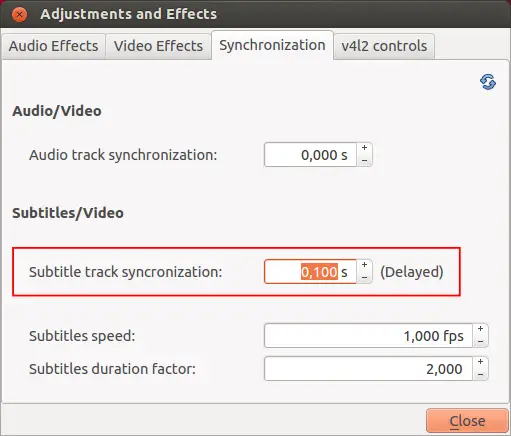
You can also set a specific delay. Go to Tools > Track Synchronization and set the delay you want.